I want to broaden the scope of the projects I put on my website to showcase the breadth of my skills. So I decided to do a super simple game that uses websockets.
The Design
The game is made up of a grid of squares for the game board, and a leaderboard to track everyone’s points and who is in the lead. The idea is whoever can click a lit-up square the fastest gets a point. With no restriction on how many players there could be, I wanted to make sure every player is unique and recognizable. I decided to randomly generate colors and then generate a name to go with that color, so we’d have a red player named “Strawberry Red” or something silly like a teal player named “Totally Teal”.
Additionally, we would like to show what player won the race to click a light, so when we award the point, we put an animated border around the light in the color of the player who snagged it.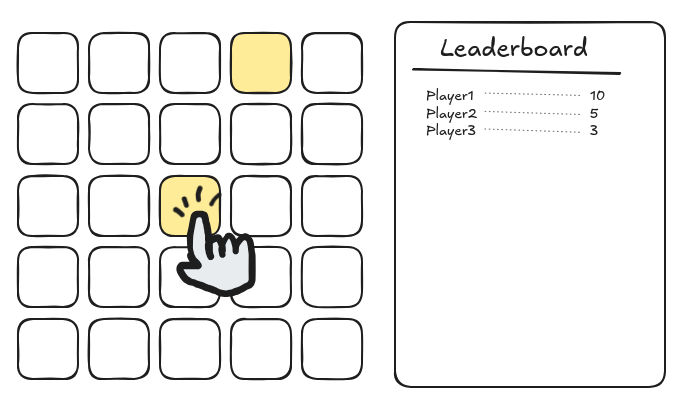
The backend would keep all state in memory and give “sync” pushes to the frontend anytime something changed. Since not much is required to represent the state of the game, I figured there’s not much overhead to blasting the entire game state to every player anytime anything happens.
The protocol would be simple:
- Client-to-server “player_request” message requests player data for a new connection.
- Server-to-client “player” message gives said data to the requesting client.
- Client-to-server “light_clicked” message tells the server when a light was clicked.
- Server-to-client “sync” message broadcasts game state.
There is a consideration in the design of the game as to what counts as clicking first. I decided to award the point to the player whose message reached the server first, rather than tracking local time and comparing on the server. Comparing local click times would mean having a grace period to allow for latency, and I feel it would be a worse experience overall. This can be changed easily down the line.
The Node
I threw together the server in Node/Bun, and it worked great! Low latency, it felt instant to click on a light and have the response animation. However, I want to put the project on my website, and running the server constantly would be difficult to maintain, take up unnecessary resources, and be a potential attack vector for my development server. So how do I host it?
Here I looked to AWS, and I saw two options:
1: EC2 instance I could spin up a virtual server on an incoming websocket request, and run the node server as long as there are players connected to the websocket. This would mean no change to my code, and I’d only pay for the time the instance is running.
2: Lambda functions Lambda functions would give a faster initial response time with the spinning up / shutting down being built in. The downside is there is no guarantee of continuous memory – I would have to get/set all local data to a database, potentially increasing response times.
I decided to try for Lambda functions first.
The Lambda
To set up a websocket API with Lambda controlling responses, I made an API Gateway websocket and pointed all communications through a single Lambda function. Since most operations would use the same basic functions, I felt like having the $connect, $message, and $disconnect all go to one Lambda function was best. Then, I refactored my node server into its basic components and implemented setting/getting from dynamodb instead of local state.
I kept running into permission issues with the Lambda, and I had to keep expanding the permissions it was allowed. This made sense, but I would have benefitted from some system that would tell me what permissions an API call would need when I implement it.
After the permission issues were sorted, and after much fix-and-redeploy debugging, it was finally functional! It received connections, created players on player requests, could broadcast by grabbing all connections from the DB, and handled light_click requests and syncs.
However, it was not optimal. The amount of delay was highly variable, which was unacceptable for a reaction-time based game. I measured between 600-3000ms between light_click and sync messages. Absolutely awful!
Going over my code once more I fixed several issues that would cause a higher delay, but it didn’t fix the underlying issue. At this point I assumed that Lambdas were unreliable when it came to response time.
The EC2 Instance
Since I couldn’t fix the Lambda’s response time (yet), I decided to try the other option.
Moving to EC2, I decided to use the absolute cheapest instance possible, t4g.nano. Setting up an instance and putting the original node server on, it didn’t work! This would be because my client is connecting to the webpage via HTTPS, so the websocket would need to be through WSS, requiring a certificate. I couldn’t just upload the certificate because I host my certificate on AWS and they don’t allow exporting. This meant I needed some AWS network layer configured with my certificate in front of the EC2 instance, and that made things more complicated.
I set up an Application Load Balancer to accept HTTPS requests and assigned it my *.c2k.codes cert. Then, I set the target to a new group with my instance in it. Finally, I created a subdomain to point towards the ALB so it could use the certificate. After all this, and a frustrating security/permissions issue (ALB was not initially configured to accept outside traffic) it finally worked! And it was markedly faster than the Lambda. I’d just need to figure out how to enable/disable the EC2 instance depending on incoming traffic.
I realized that I’d need to change the client code quite a bit to enable the system I was designing, and it was going to complicate things. Before I did this, I would revisit Lambdas one last time to see if I missed anything.
Back to the Lambda
I received an anonymous tip that Lambda response time for the websocket use-case can be drastically improved by allocating a bit more memory. Increasing from 128 MB to 512 MB provided immediate results: rather than the 600-3000ms we were seeing before, it was a consistent 120-160ms response time! Apparently, when you allocate more memory to your Lambda, AWS automatically allocates more CPU to match. This speedup alone was enough to make the game function as intended.
This immediately solved the problem! Being cheaper and faster to cold-start than EC2 instances, the Lambda solution won out.
You can try the game here.
Personal Takeaways
I learned about the basics of Lambda functions, and some intricacies of Application Load Balancers. I also discovered many permissions-based pitfalls and learned to start looking for permission issues first when things don’t work. Finally, I learned the absolute basics of working with DynamoDB. I’d like to do more with it and become more competent creating these types of systems.
During the development, deployment, and troubleshooting of this system, I was met with lots of strange and opaque issues. I’m grateful for the troubleshooting I had to do, as it expanded my horizons greatly for what is possible and how these systems work. The proper utilization of AI is a hot topic right now and I’m happy with my current approach. Generative AI can help a lot during development, especially with knowledge acquisition, but sometimes leaning on it too much can detract from learning experiences like this one.